
주민등록번호 생성 프로그램
- 수행 목적 : Scanner의 입력함수와 조건문 및 Random 클래스를 통한 주민번호 생성 로직 작성
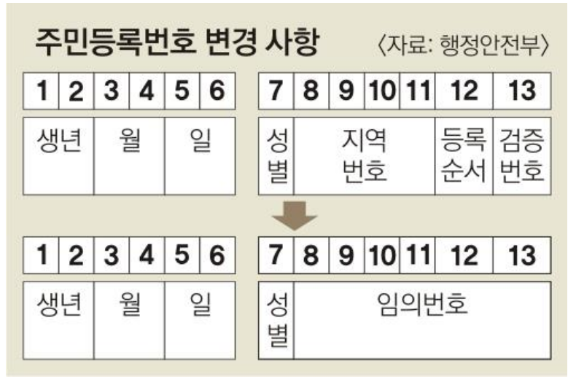
- 간략 소개 : 주민번호는 출생년도와 출생월과 성별에 대한 내용을 포함하여 만들어지는 숫자로 된 체계입니다.
이에 2020년도 부터 생성 조건이 변경되었습니다. 이를 조건에 맞게 생성하는 프로그램을 작성해 보세요.
※ 필수 준수사항
1. 주민등록번호 생성 로직에 맞게 주민등록번호 생성
2. 입력값은 생년, 월, 일, 성별과 임의의 번호를 통해서 생성
3. 임의번호는 Random 함수의 nextInt() 함수를 통해서 생성

java.util.Random 클래스
Random 클래스는 난수를 생성하는 클래스로 객체를 생성하여 사용한다.
· nextBoolean() : true 혹은 false
· nextInt() : -2147483648 ≤ x ≤ 2147483647 (Integer)
· nextInt(int bound) : 0 ≤ x < bound (Integer) (bound 값은 포함x)
· nextLong() : -9223372036854775808L ≤ x ≤ 9223372036854775807L (Long)
· nextFloat() : 0.0 ≤ x < 1
· nextDouble() : 0.0 ≤ x < 1
· nextGaussian() : 평균 0.0이며 표준편차가 1.0인 정규분포(가우스 분포) 난수 생성
- 위와 같이 많은 함수들이 존재하는데 Math와 달리 Random 클래스만의 장점이라 볼 수 있는 것은 객체를 재활용하여 지속적으로 사용 가능하다는 점이다.
작성 코드
// 주민등록번호 생성 프로그램


import java.util.Random;
import java.util.Scanner;

public class Adult {
    public static void main(String[] args) {

        Scanner sc = new Scanner(System.in);

        while (true) {
            System.out.println("[주민등록번호 계산]");
            System.out.print("출생년도를 입력해 주세요.(yyyy) : ");
            int year = sc.nextInt();
            if (year < 1000 || year > 2023) {
                System.out.println("출생년도 4자리를 정확히 입력해 주세요.");
                System.out.println("입력 값이 초기화 되었습니다.");
                System.out.println();
                continue;
            }
            System.out.print("출생월을 입력해 주세요.(mm) : ");
            int month = sc.nextInt();
            if (month <= 0 || month > 12) {
                System.out.println("출생월(0~12)을 정확히 입력해 주세요.");
                System.out.println("입력 값이 초기화 되었습니다.");
                System.out.println();
                continue;
            }
            System.out.print("출생일을 입력해 주세요.(dd) : ");
            int day = sc.nextInt();
            if (day <= 0 || day > 31) {
                System.out.println("출생일(1~31)을 정확히 입력해 주세요.");
                System.out.println("입력 값이 초기화 되었습니다.");
                System.out.println();
                continue;
            }
            int num1 = 0;
            System.out.print("성별을 입력해 주세요.(m/f) : ");
            char gender = sc.next().charAt(0);

            if (gender == 'm' && year < 2000) {
                num1 = 1;
            } else if (gender == 'f' && year < 2000) {
                num1 = 2;
            } else if (gender == 'm' && year >= 2000) {
                num1 = 3;
            } else if (gender == 'f' && year >= 2000) {
                num1 = 4;
            } else {
                System.out.println("성별(m/f)을 정확히 입력해주세요.");
                System.out.println("입력 값이 초기화 되었습니다.");
                System.out.println();
                continue;
            }

            System.out.print(String.format("%d%02d%02d" + "-" + "%d", year, month, day, num1));

            Random random = new Random();
            for (int i = 0; i < 6; i++) {
                System.out.print(random.nextInt(10));
            }
            break;
        }
    }
}
https://gist.github.com/coha96/5fedd9e1d74f585d43f5243a5230e337
'JAVA > 백엔드_미니과제' 카테고리의 다른 글
| 가상 대선 당선 시뮬레이션 프로그램 (0) | 2023.03.10 |
|---|---|
| 달력 출력 프로그램 (0) | 2023.03.08 |
| 놀이동산 입장권 계산 프로그램 (0) | 2023.03.07 |
| 결제 금액 캐시백 계산 프로그램 (0) | 2023.03.06 |
| 구구단 출력 (0) | 2023.03.05 |